







Hi everyone!
In today’s post, I want to tell you about a new tool I’ve discovered to optimize the use of Claude Code (but also OpenCode or Codex): it’s called ColGrep-Agent-2B, a local agent developed by LightOn AI that helps reduce token consumption during the code localization phase. The model is small enough to be run locally!
If you use Claude Code, you know that every time the agent needs to search for a file or a function, the entire accumulated context is sent back to the frontier model. This not only increases costs if we use APIs but can also lead to saturating the context more quickly. ColGrep’s idea is simple: move the semantic search locally, so that Claude (or whoever) receives only the exact paths and line ranges it needs.
Let’s dive deeper to understand how it works and how to use it.
How ColGrep-Agent-2B works
Unlike a simple grep or find, ColGrep doesn’t just search for text strings, it uses semantic search. The core of the system is a multi-vector engine called NextPlaid and a specialized language model with only 2 billion parameters.
Basically, the system pulls out functions, methods, and classes through Tree-sitter and calculates embeddings directly on the CPU. When you ask the agent a question, ColGrep analyzes the meaning of the request and returns the most pertinent files and line intervals to the coding agent in the path:START-END format.
The advantage is huge: the code never leaves your machine and the frontier agent doesn’t have to “waste” tokens navigating blindly through the project folders.
Setup and installation
Setting up ColGrep on your PC is pretty quick. If you’re on macOS, you can use Homebrew to install everything in one go:
brew install lightonai/tap/colgrep && colgrep --install-agentFor those using Windows or Linux, you can install it via shell scripts, PowerShell or, if you have Rust installed, via cargo install colgrep && colgrep --install-agent.
Note that while inference is optimized with Accelerate and CoreML on macOS, it runs only on the CPU on Linux and Windows (unless you compile the tool from source by enabling the CUDA features to use the GPU).
The --install-agent command downloads the GGUF model. Depending on the amount of RAM you want to dedicate to the process, you can choose between different quantizations:
- Q4_0: about 1.49 GB
- Q4_K_M: 1.56 GB
- Q5_K_M: 1.81 GB
- Q6_K: 2.07 GB
- Q8_0: 2.68 GB (default version)
- F16/BF16: 5.04 GB
Once installed, you need to index your project so the agent can work correctly:
colgrep init /path/to/your/projectNote that the index is updated incrementally after each search, so there’s no need to redo it every time you modify a file.
Integration with Claude Code and other agents (OpenCode or Codex)
The real strength is the integration with Claude Code. To enable it, just run the command:
colgrep --install-claude-codeThis command installs session hooks that suggest Claude use ColGrep instead of the classic search commands. Once you restart Claude Code, the integration will be active.
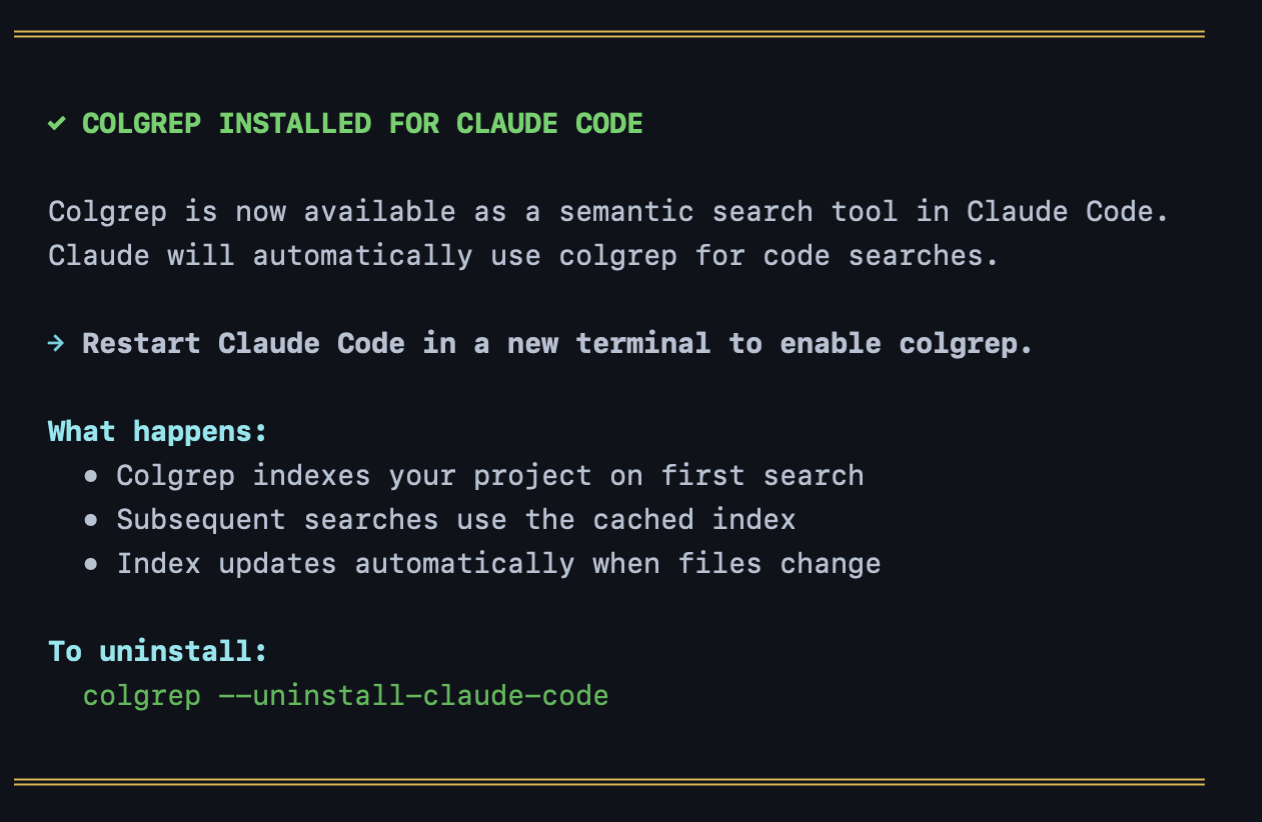
If you use other agents like OpenCode, Codex, or Hermes, you can install the integration using the respective commands (--install-opencode, --install-codex or --install-hermes). In this case, however, the integration is more basic: you won’t have the full hook support that Claude Code provides.
You can also choose how the agent should behave using the colgrep settings --hook-mode command. There are three options:
hybrid(default): uses ColGrep for names and patterns, and the semantic agent for more complex questions.agent: always suggests usingcolgrep --agent, maximizing token savings.colgrep: disables the semantic agent and uses only index-based search.
The numbers: how much do you actually save?
The data provided by LightOn AI is very interesting. In a test conducted on 13 repositories (with sizes up to 1.8 million lines) using Claude Sonnet 5.5, the results show a clear cost advantage.
Token savings: using ColGrep-Agent reduced tokens per question from 142k (with standard grep) to 93k, with an average saving of 34.3%.
In terms of cost, we’re talking about dropping from about 7.3¢ to 4.4¢ per question. If you work on huge projects, the savings become even more evident: on repositories over a million lines, efficiency increases up to 46%.
There is a trade-off, though: latency. Generally, grep is much faster while local model inference takes time (in some cases up to 20 seconds on an M3 Pro).
Conclusions
As time goes by, local models are becoming more reliable and smaller, allowing us to actually use them without owning a DGX Spark or whatever high-end hardware, at reasonable speeds.
In today’s example, we’ve seen this small model in action: it’s not the solution to every problem, but I see it as a “tool” in our toolkit, something to use strategically to help cut down on token usage.
See you next time!